
Your Loans & Account
The following information relates to borrowing Bayreuth University’s physical collection as well as managing the loan periods of physical media in your library account. Information on the electronic collection of the library (e.g. e-books, e-journals, databases, newspapers, and accessing electronic media from off-campus) can be found on separate dedicated webpages.
Using the UB Catalogue you can carry out the following functions related to loaning physical media on your own:
- Searching literature
- Ordering media and reserving media that is on loan
- Checking your library account and current loans
The library staff is happy to help you with any questions concerning these services.
Library Account (Library User Number and Password)
Members of the University log into the UB Catalogue by using their Personal User ID (bt-ID) and corresponding password to order media or access their library account.
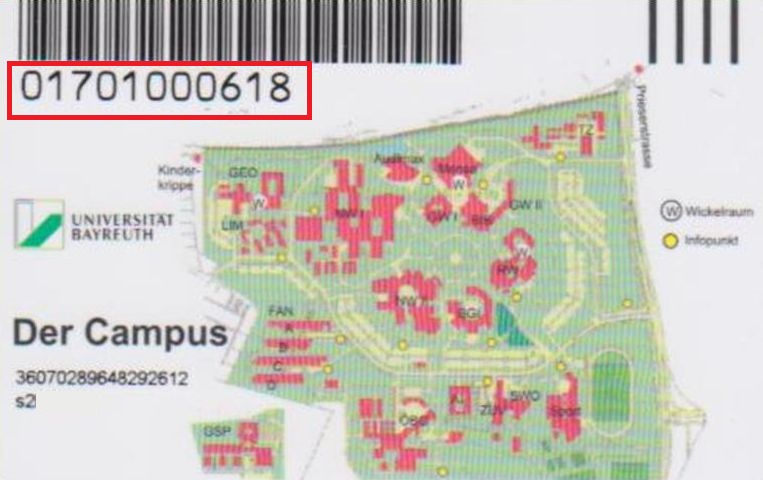
External users login with their library user number. The library user number can be found on the back of the library card below the barcode. When logging into the UB Catalogue for the first time, a new password must be set via the “Forgot Password” function.
An overview on the library passwords can be found here.
Loans and Ordered Media
With a valid library card you can borrow and order media. You can check locations and availability of media using the UB Catalogue:
- "Open Stacks" (Freihand):
You can find these items in the freely accessible collections of the library. Please retrieve the items from the shelf yourself. Note down the call number to find the items in question. You can borrow the items using the self-checkout devices or by contacting the circulation desk. - “Closed Stacks” (Magazin):
Please order these items using the UB Catalogue. Choose Main Library or one of the departmental librarie as a pick-up locations. You will receive an e-mail notification when the requested item is ready for pick up. - “Reference Collection” (Präsenzbestand):
These items cannot be borrowed, but can be used inside the library. Alternatively, you can make photocopies or scan pages of these items. - “Lecturers’ Reserve Collections” (Handapparat):
Media on lecturers’ reserve collections are displayed in the UB Catalogue, but cannot be ordered, reserved or borrowed. Please contact the chair/institution in question directly.
Borrowing Media
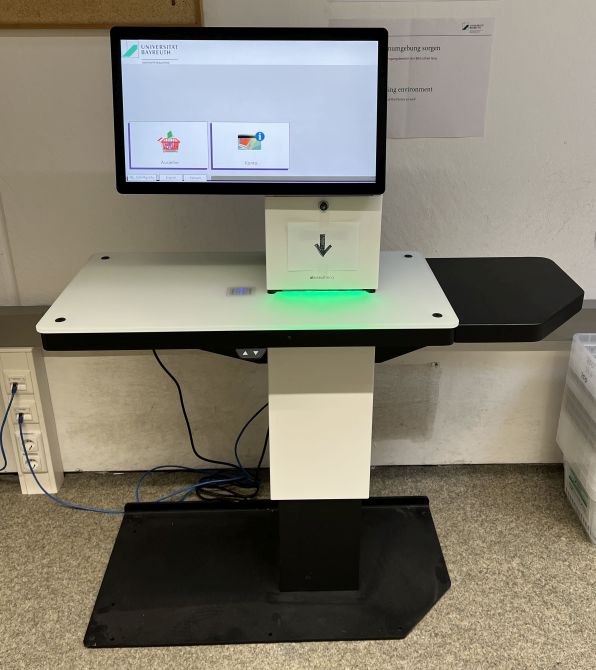
To borrow media, we offer you self-checkout devices in every library.
Ordered media is only available on the pick-up shelf/desk for a limited amount of time. Please check your library account, for how long your ordered items are available for pick-up.
Media for reading room use only can be collected at the circulation desk. If you cannot find your collection code or your orders, please contact us at the circulation desk.
The media ordered can be borrowed using the self-checkout devices. For check-out by proxy, please contact the circulation desk.
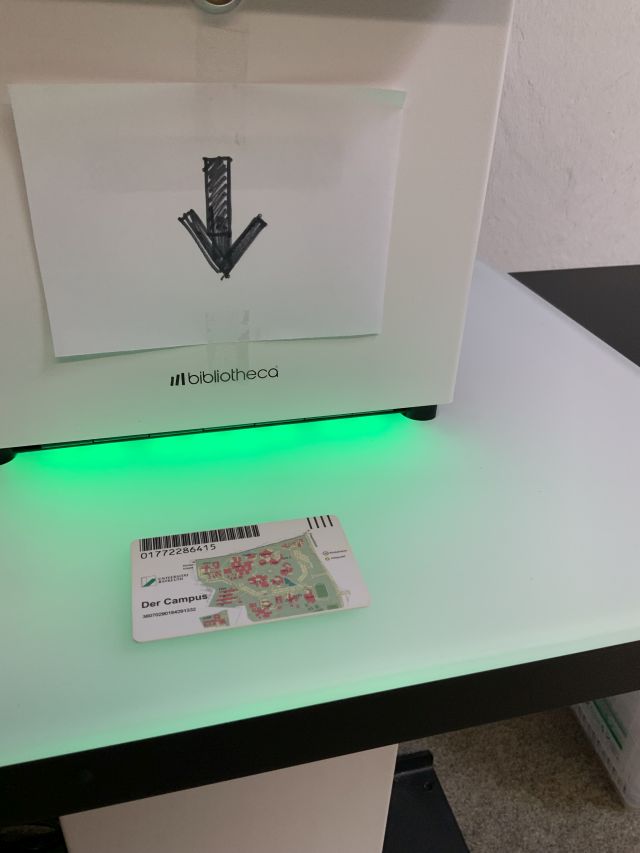
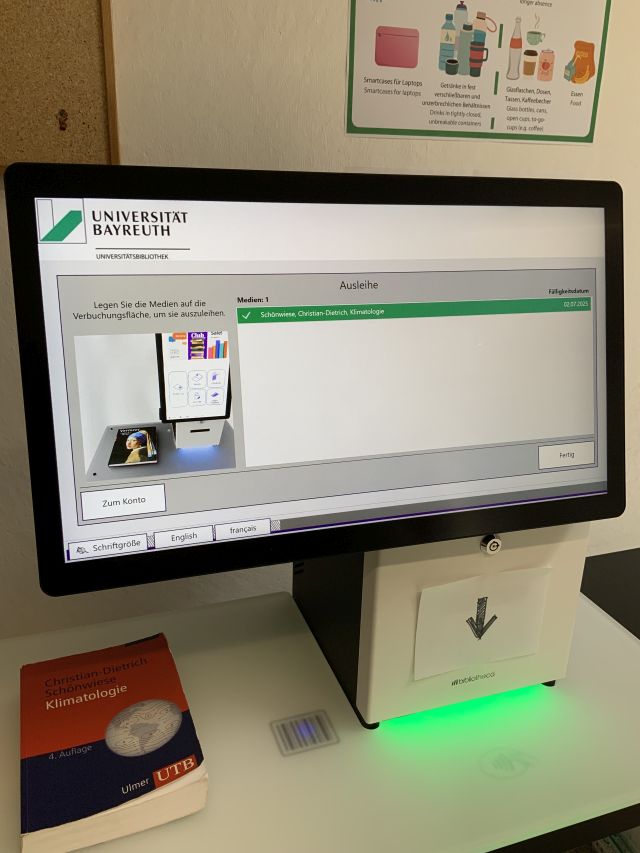
You can switch the language settings to English by clicking the corresponding icon. Click the button “Check-out” and hold your library card towards the area illuminated in green marked with the RFID symbol to log in. Place the items you want to borrow on the backlit glass panel on the left side where a barcode is displayed one by one. Wait for the title of the item you want to borrow to be highlighted in green in the title list. You can then remove the borrowed item and, if necessary, continue borrowing other items in the same way.
You can exit the process by clicking "Finished".
A receipt for the loan will automatically be sent to the e-mail address that is connected to your library account.
You can exit the process by clicking "Finished".
A receipt for the loan will automatically be sent to the e-mail address that is connected to your library account.
Further Tips on Using the Self-Checkout Devices:
- Before borrowing, please check the media for any damage and/or any inserts (e.g. CDs). If an item is damaged or the specified insert is missing, please contact the library staff.
- If a title is highlighted in red in the title list, an error has occurred during the checkout process. Please contact the library staff in this case, as well as if any other technical problems should occur.
- Checking out media by proxy (= using a “Vollmacht”) is not possible at the self-checkout devices. The library card is required. For check-out by proxy, please contact the circulation desk.
Ordered Media
The media you order is placed on a freely accessible pick-up shelf or on a pick-up desk in each library. The requested items on the shelf/desk are sorted alphabetically by collection code. The collection code consists of the first 3 letters of your surname, the first letter of your first name and the last 5 digits of your library user number (e.g., TesA12345).Ordered media is only available on the pick-up shelf/desk for a limited amount of time. Please check your library account, for how long your ordered items are available for pick-up.
Media for reading room use only can be collected at the circulation desk. If you cannot find your collection code or your orders, please contact us at the circulation desk.
The media ordered can be borrowed using the self-checkout devices. For check-out by proxy, please contact the circulation desk.
Returning Media, Renewals, Reservations
Returning Media
You can return borrowed items in the Main Library and in all departmental libraries. You do not need a library card to return items.
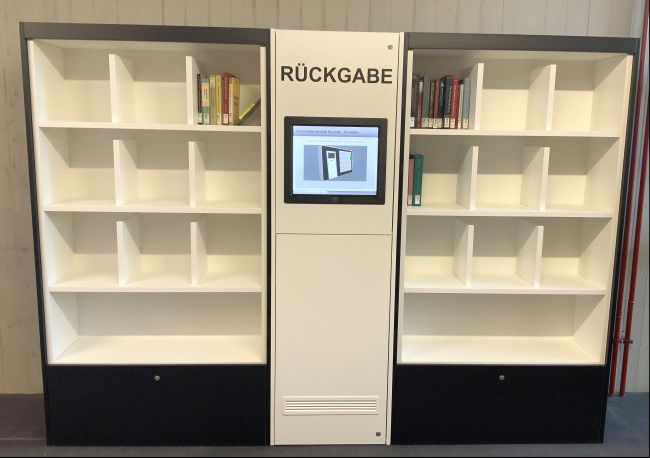
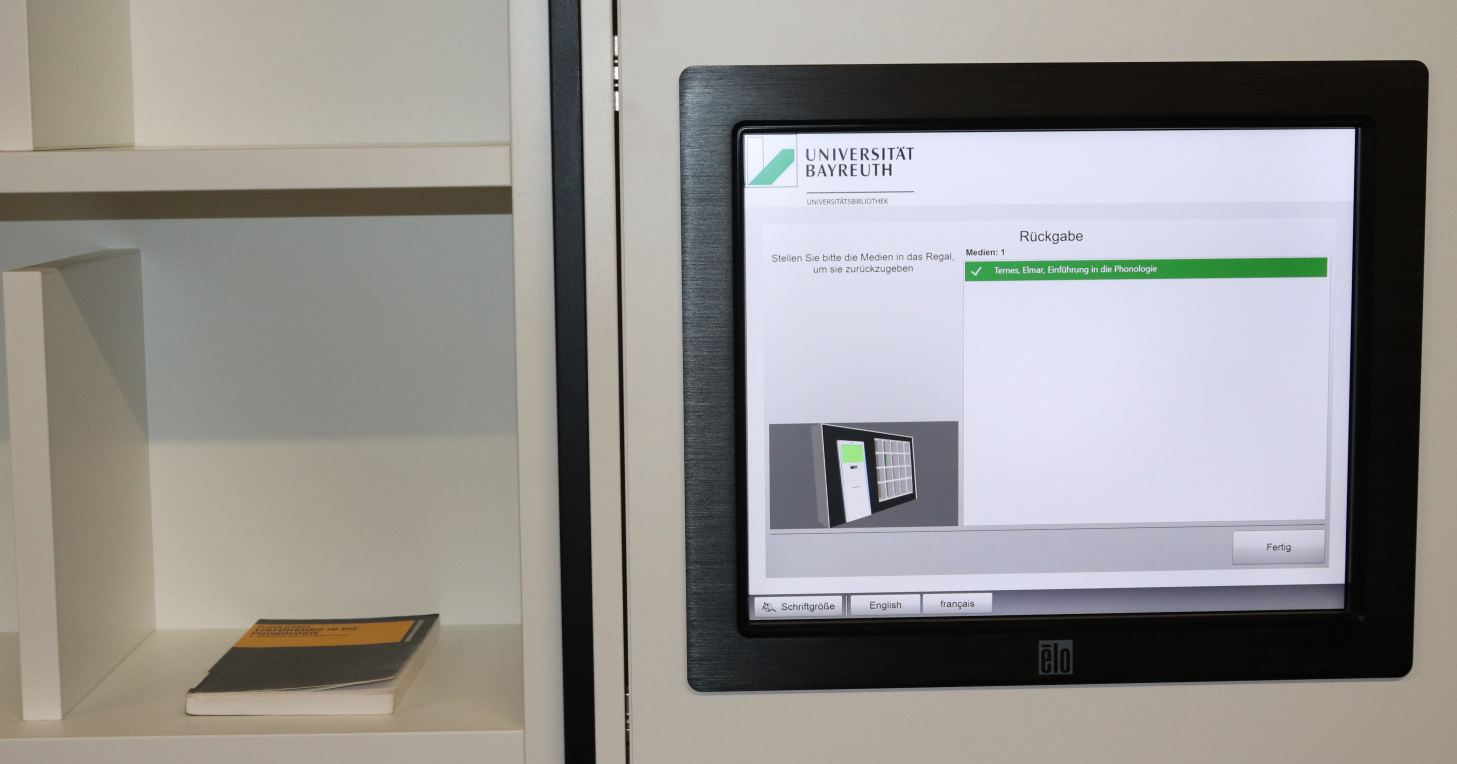
You cannot return items at the self-checkout device. You can return media at the circulation desk or, in the Main Library, using the smart return shelf.
If you want to return media outside of the library’s opening hours, please use the letterbox in front of the main entrance of the Main Library. Please pack your media safely. If you are dropping off returns at another location on campus, please pack them into an envelope and write your name, the library name and ‘Returns’ on it.
You cannot return items at the self-checkout device. You can return media at the circulation desk or, in the Main Library, using the smart return shelf.
If you want to return media outside of the library’s opening hours, please use the letterbox in front of the main entrance of the Main Library. Please pack your media safely. If you are dropping off returns at another location on campus, please pack them into an envelope and write your name, the library name and ‘Returns’ on it.
Return Shelf (Main Library)
The return shelf registers the items placed on it using their RFID-tags, reads the media numbers and transmits them to the library system in order to process the return. The returns are displayed on the shelf’s screen. It may take a moment for all returns to be listed.Tips and Further Information:
- It is possible to return multiple items at once.
- Please ensure that all the items are complete (including any inserts, such as CDs or DVDs) before returning them.
- There is no receipt when returning items through the return shelf. If you require a receipt, please return the items at the circulation desk and ask for a receipt. It is not possible to issue a return receipt retrospectively.
- You can loan items that have been returned through the return shelf immediately, if they are not reserved for somebody else, or an interlibrary loan item.
- Items without RFID-tags cannot be returned through the return shelf. Please return these at the circulation desk.
- Please return damaged items at the circulation desk.
- The return shelf is not a cloakroom. Therefore, jackets and bags must not be left there – also because any media inside the bags will otherwise be immediately recorded as returned by the device as well.
Return Box (Departmental Library LEG, Location Kulmbach)
For returning media in the Departmental Library LEG (location Kulmbach) during unstaffed hours, we offer you a grey return box. Please note that the returning of media via the return box will only be processed on the next business day (Monday through Friday, except for public holidays). When time sensitive returns are involved, for example in order to avoid being charged reminder fees in case of late returns, please contact the library staff instead. The return box is accessible during the building’s opening hours.
Renewals
Loan periods cannot be renewed manually through your library account.
The loan period is automatically renewed by two weeks each renewal, provided that no reservation has been placed on the item by another person. Students and staff of the University of Bayreuth may renew items up to a maximum of twenty times, while external users may renew items up to a maximum of four times.
The loan period is automatically renewed by two weeks each renewal, provided that no reservation has been placed on the item by another person. Students and staff of the University of Bayreuth may renew items up to a maximum of twenty times, while external users may renew items up to a maximum of four times.
Reservations
Items that are currently on loan can be reserved using the UB Catalogue. You will be notified once the item is ready for pick-up.
Mailing Items (Lending/Returning)
Chargeable Book Mailing Service
If you are not near Bayreuth, students of Bayreuth University can have up to seven items from the holdings of Bayreuth University Library at a time sent to their home via a chargeable book mailing service via DHL. This is possible within Germany.To do this, write down all the media you want in the form "Order form for the chargeable mailing of library books" (only available in German).
You can also request interlibrary loans that have already been ordered. All media marked as "available for order" in the UB Catalogue (for example media from the closed stacks ("Magazin") must be ordered in advance via the UB Catalogue of Bayreuth University Library to the personal library account. Please select the Main Library as the pick-up location.
This service does not apply to books from the reference collection (e.g. location 31 or books in course reserve collections).
Please note that you can only use this service if you already have a valid Campus-Card from the University of Bayreuth.
Returning Media by Mail
You can return media by mail. Please send them to the following address:Universitätsbibliothek Bayreuth
Ausleihe
Universitätsstr. 30
95447 Bayreuth
We repeatedly encounter problems with the provider Hermes. Some shipments to us are not delivered for no comprehensible reason and are returned to the sender.
Notifications
The library will send you notifications when requested items are ready for pick-up, as well as reminders for expiring loan periods.
Only one e-mail address can be listed in the library account.
Only one e-mail address can be listed in the library account.
If you do not receive such e-mails from the library even though your library account is connected to a valid e-mail address, firewall restrictions of your e-mail provider might be the cause.
This service is therefore provided without guarantee. It does not relieve you of the responsibility toof monitoring your loan periods yourself.
Members Bayreuth University
For members of the university, the personal university e-mail address is automatically registered to the library account. It is not possible to change it.Only one e-mail address can be listed in the library account.
External users
For external users, providing an email address during registration is mandatory; otherwise, a library card cannot be issued. If the email address changes, please contact the Bayreuth University Library (auskunft.ub@uni-bayreuth.de).Only one e-mail address can be listed in the library account.
If you do not receive such e-mails from the library even though your library account is connected to a valid e-mail address, firewall restrictions of your e-mail provider might be the cause.
This service is therefore provided without guarantee. It does not relieve you of the responsibility toof monitoring your loan periods yourself.
Fees
The normal usage of the University Library is free of charge (admission, borrowing, reservations, etc.) but certain special services will require a fee to be paid (e.g. international interlibrary loan, overdue reminders, scan services). These special services and the corresponding costs can be found in our list of library fees.
Late fees can be paid via ePayBayern. As a payment reference you need to put the following person holding account (PK-Nr.) for the payment to be identified correctly: 2528.2800.0045.
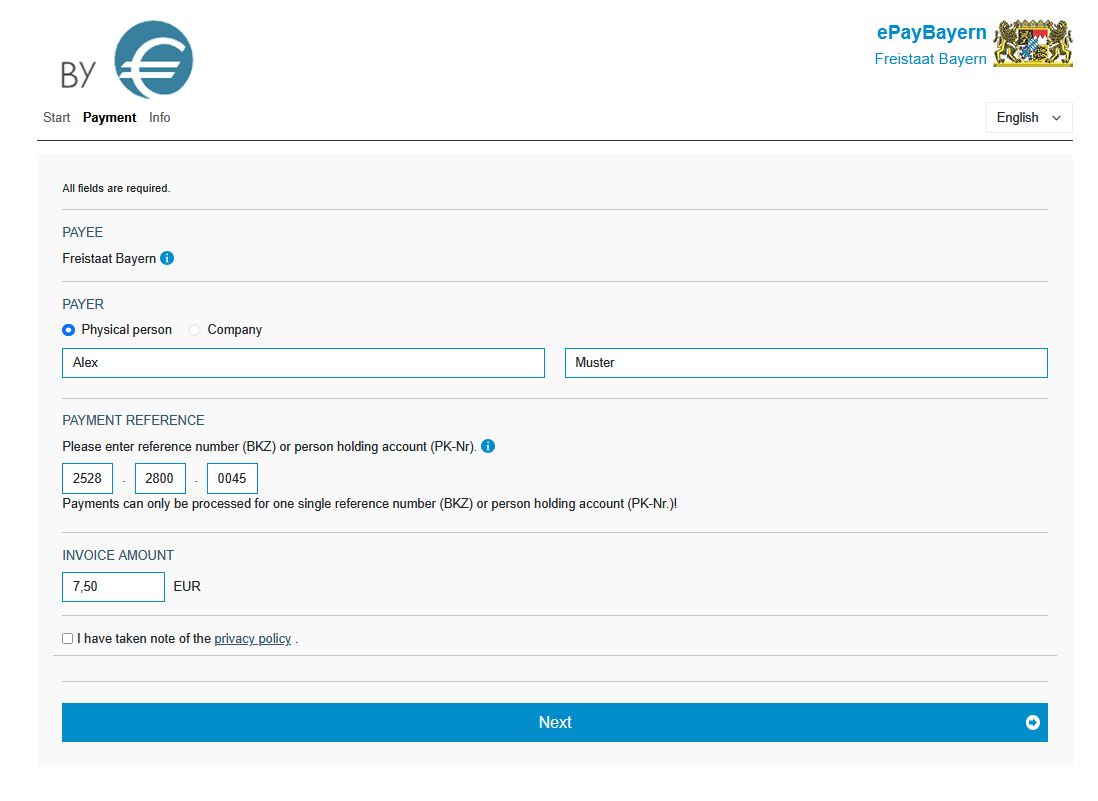
Alternatively, you can also wire the money directly (IBAN: DE84 7500 0000 0074 3015 30 BIC: MARKDEF1750). In this case, please also always put the person holding account (PK-Nr.), 2528.2800.0045, as well as your name as the payment reference for the payment to be identified correctly.
It usually takes some time for the Bavarian State Treasury to notify us that a payment has been received. To ensure that your library account is cleared and unblocked, please send the confirmation from ePayBayern or proof of payment (e.g. a bank statement) to mahnung.ub@uni-bayreuth.de once you have made the payment.
Please consult the information sheet about the library fee system for more information on library fees and how to pay them.
If you have questions concerning your fees, please contact us (telephone: 0921 / 55 – 6166 (8.30 - 12.30), e-mail: mahnung.ub@uni-bayreuth.de).
Alternatively, you can also wire the money directly (IBAN: DE84 7500 0000 0074 3015 30 BIC: MARKDEF1750). In this case, please also always put the person holding account (PK-Nr.), 2528.2800.0045, as well as your name as the payment reference for the payment to be identified correctly.
It usually takes some time for the Bavarian State Treasury to notify us that a payment has been received. To ensure that your library account is cleared and unblocked, please send the confirmation from ePayBayern or proof of payment (e.g. a bank statement) to mahnung.ub@uni-bayreuth.de once you have made the payment.
Please consult the information sheet about the library fee system for more information on library fees and how to pay them.
If you have questions concerning your fees, please contact us (telephone: 0921 / 55 – 6166 (8.30 - 12.30), e-mail: mahnung.ub@uni-bayreuth.de).
Lost or Damaged Media
Using books leaves marks on them. Please handle them with care.
In case library media has been damaged, please inform our staff at the circulation desk when returning it, and read this information sheet.
If you lose any of our media, please report it immediately the reminders office (telephone: 0921 / 55 – 6166 (8.30 - 12.30), e-mail: mahnung.ub@uni-bayreuth.de)
Please do not highlight, underline or write comments in the books. Pencils are no exception.